If you’ve just started on an insulin pump — a small, wearable device that delivers insulin continuously through a thin tube or patch, replacing multiple daily injections — nobody warned you about the awkward middle phase. The pump is working. Your blood sugar is improving. But the device feels like a brick clipped to your waistband, you’re nervous about rolling over in bed and ripping out the tubing, and the cartridge-filling process at 11 p.m. feels like defusing a bomb. That’s normal. The good news: a small set of inexpensive accessories can solve most of those problems in a week. This guide covers four specific products — two pump belts, a cartridge filling tool, and a screen protector — with honest notes on where each one earns its place and where it falls short. We’ll end with a clear decision framework and answers to the questions buyers are actually searching before they hit purchase.
Why Pump Accessories Exist (And Why Most Wearers Buy Them Reactively)
Per Healthline’s overview of living with an insulin pump, the adjustment period for new pump wearers is real and underreported. Devices like the Tandem t:slim X2 and Medtronic MiniMed 780G are engineered for clinical precision — they are not engineered for sleeping on your stomach, wearing a fitted dress, or keeping a seven-year-old from catching the tubing on a doorknob.
The accessory market fills that gap. The problem is that most wearers discover accessories after a specific incident: a pump knocked off a nightstand, a cartridge fill that took three frustrating attempts, a screen scratched beyond readability. The goal here is to get you to “I need this” before the incident — not after.
A note on scope: this article covers tubed pump accessories primarily. Omnipod DASH and Omnipod 5 users have a different set of needs (patch adhesion, carrying cases) that deserve their own guide.
The Double-Zipper Sleep Belt: The Accessory Most Wearers Buy First
The single most common review narrative across insulin pump accessories is the “oversized pager” anxiety that hits in week one. New wearers describe the same arc: clipping the pump to a waistband feels fine during the day, but sleeping with it is disorienting. The pump slides off the bed. The tubing catches. You wake up at 2 a.m. convinced you’ve pulled out your infusion site.
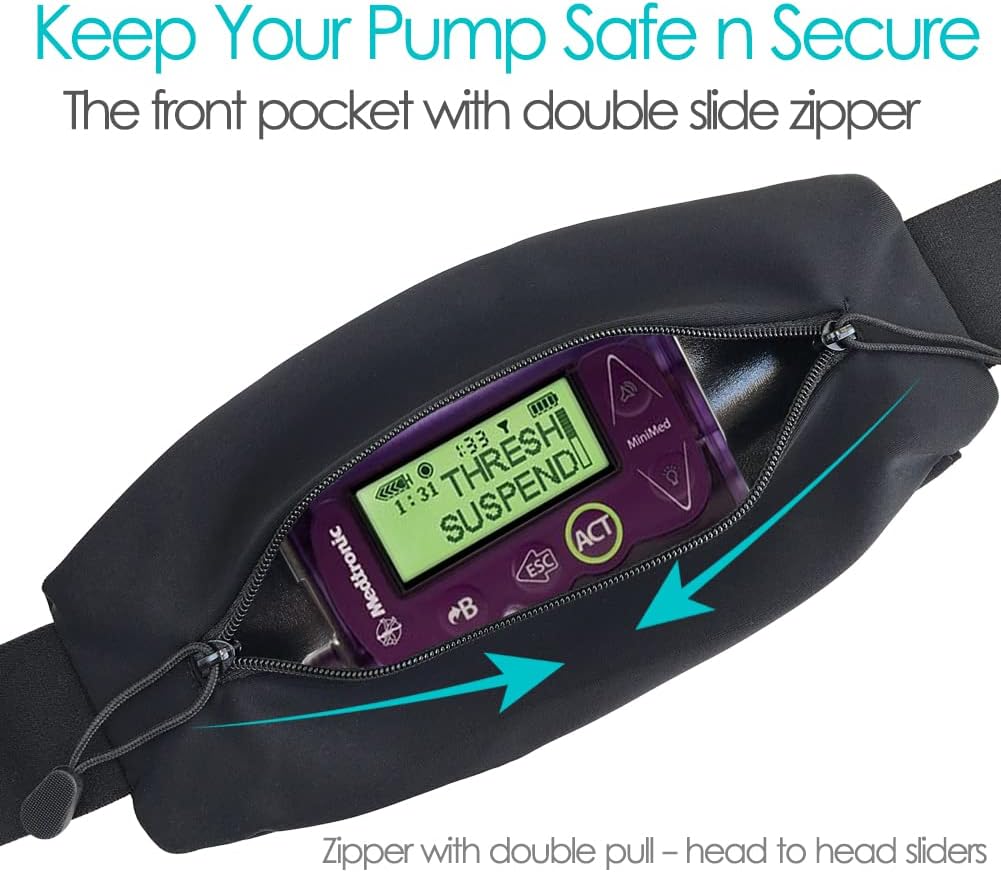
The double-zipper pump pouch belt (a soft elastic waist belt with two zipper access points and a mesh window panel) solves this specific problem well. Reviewers consistently describe the transition in the same language: from feeling like they’re sleeping with a device attached to them, to sleeping comfortably with the pump secured against their body. The two-zipper design matters practically — one zipper for quick bolus access, one for tubing exit — and the mesh window lets a Dexcom or Libre reader pick up the CGM signal without removing the pump.
What owners say works: The belt sits flat under pajamas, doesn’t migrate during sleep, and is washable. First-time wearers repeatedly describe it as the single purchase that made the adjustment period feel manageable.
What to know before you buy:
- Sizing runs small for larger torsos; order up if you’re between sizes.
- The elastic can loosen over several months of daily washing. Reviewers suggest air-drying rather than machine-drying to extend lifespan.
- This belt is brand-agnostic — it works with Tandem, Medtronic, and most other tubed pumps.
The honest tradeoff: It’s a sleep accessory first. The belt is bulkier under fitted clothing than a simple clip. If your primary frustration is daytime concealment in professional settings, a slimmer single-pocket belt may serve you better.
The Tandem-Specific Belt: Better Fit, One Real Limitation
The Tandem t:slim pump belt is purpose-built for the t:slim X2’s dimensions and button layout. Reviewers who switch to it from generic belts consistently note a better fit — the pump doesn’t shift inside the pouch, and the window aligns more reliably with the touchscreen.
Here’s the tradeoff most accessory reviews skip: you cannot easily bolus while the pump is zipped inside this belt. The t:slim X2 requires a two-button press to wake the screen, followed by touchscreen navigation. The belt’s window is for viewing, not for full tactile operation. To give a bolus using the full touchscreen workflow, you need to unzip and remove the pump — which takes 15 to 20 seconds and requires two hands.
For some wearers, this is a non-issue. If you use a connected CGM system where your physician has enabled Control-IQ automation (Tandem’s algorithm that adjusts basal rates automatically based on sensor glucose), your manual bolus frequency may be low enough that the removal step is only mildly inconvenient.
If you bolus frequently by hand — for snacks, corrections, active insulin management — this friction compounds across a day. Several reviewers describe abandoning the Tandem belt specifically for this reason and returning to a generic clip or the double-zipper belt for daytime use.
Decision frame:
- Heavy Control-IQ reliance, low manual bolus frequency → Tandem belt is a strong fit
- Frequent manual bolusing → consider the double-zipper belt or a clip-style holster instead
By the numbers: Tandem belt vs. double-zipper belt
| Factor | Tandem-Specific Belt | Double-Zipper Belt |
|---|---|---|
| Pump fit precision | Excellent (t:slim only) | Good (brand-agnostic) |
| Bolus access speed | Slow (remove pump) | Faster (zipper window) |
| Sleep comfort | Moderate | High (primary use case) |
| Clothing concealability | Moderate | Moderate |
| Washability | Hand wash | Machine wash (air dry) |
The Cartridge Filling Tool: Niche Product, Clearest Use Case
Cartridge filling refers to the process of drawing insulin from a vial into the pump’s reservoir (cartridge) before loading it into the device. It requires handling a syringe, managing air bubbles, and doing it correctly under time pressure — often when you’re tired, distracted, or dealing with a sensor alarm in the background.
The Tandem cartridge filling tool is a small, reusable device that holds the vial and cartridge in a fixed orientation, stabilizes your grip, and reduces the fine-motor demand of the fill process. The American Diabetes Association’s Standards of Care in Diabetes 2025 (Section 7) notes that cognitive burden is a meaningful and underappreciated component of diabetes management — the mental overhead of managing a pump system compounds across multiple daily tasks.
This product’s strongest signal comes from diabetes educators who recommend it to newly diagnosed Type 1 patients starting pump therapy. The reported benefit is not speed — experienced pump users can fill a cartridge reliably without it — but cognitive simplification. Reviewers who describe benefiting most are those dealing with anxiety around the fill process, fine motor challenges, low vision, or nighttime fills when dexterity is reduced.
The honest assessment: This is the most niche product in the guide. If you’ve been on a Tandem pump for 18 months and your fill process is reliable and low-stress, you don’t need this. If you’re in the first three to six months of pump therapy, or you’re a caregiver filling cartridges for a child or aging parent, the tool earns its price by removing a recurring point of failure.
Is it FSA/HSA eligible? Diabetes management supplies used with a prescribed insulin pump generally qualify as FSA/HSA-eligible expenses. Verify with your plan administrator, as eligibility can vary by plan and documentation requirements. The IRS Publication 502 (Medical and Dental Expenses) lists “equipment for diabetes” as an eligible category.
The Medtronic Screen Protector: High Reward, High Installation Risk
The Medtronic MiniMed pump screen protector protects the pump’s display from scratches and scuffs — a legitimate concern given that the pump lives in pockets, bags, and belt pouches with keys, coins, and other abrasives. Per the FDA’s device guidance on insulin pump labeling, manufacturers are not required to rate pump screens for scratch resistance, and most consumer-grade pump screens are exposed polycarbonate or tempered glass without factory coating.
The case for the screen protector is straightforward: a scratched screen is a usability problem, not just a cosmetic one. On the MiniMed 780G, the screen is your primary interface for reviewing glucose trends, confirming boluses, and navigating settings. If glare from scratches makes the screen harder to read in direct sunlight, that’s a functional issue.
The installation problem is real. Across aggregated reviews, the most common negative outcome is a failed first installation — bubbles, dust trapped under the protector, or misalignment that leaves a corner lifted. One reviewer’s account is particularly instructive: they failed on the first attempt, allowed the adhesive to fully set before peeling (which made removal easier without damaging the screen), cleaned the surface a second time with the included wipe, and succeeded on the second try.
The signal here is that installation guidance is essential, and the product’s included instructions are minimal. Before applying:
- Work in a low-dust environment (a freshly cleaned bathroom after a shower works well — steam settles airborne particles).
- Use the included microfiber cloth in one direction only, not circular motions.
- Peel the protector slowly at a shallow angle.
- A squeegee card (often included) should be used immediately after placement to push out bubbles from center to edge.
Will a screen protector void your pump warranty? Per Mayo Clinic’s guidance on insulin pump therapy and generally accepted manufacturer policy, cosmetic accessories applied externally do not void device warranties for mechanical or software failures. However, if the protector causes screen damage during installation or removal, that damage may not be covered. Document your screen’s condition before installation with a photograph.
Frequently Asked Questions
Can I sleep with my insulin pump in a belt pouch comfortably? Yes — and for many wearers, the belt makes sleeping more comfortable than the clip-to-waistband alternative. The key is choosing a soft elastic belt rather than a rigid holster. Reviewers consistently describe adapting within one to two nights.
Will a pump belt work under clothing without showing? Under loose or layered clothing, most elastic pump belts are not visible. Under fitted clothing — athletic wear, dress shirts, fitted dresses — there will be a slight profile. Thinner single-pocket designs minimize this more than double-zipper pouches.
Can my child wear a pump belt to school safely? Yes. Pump belts are a common solution for school-age children with Type 1 diabetes specifically because they keep the pump secure and less accessible to accidental tugs. Caregivers and school nurses report that under-clothing belt placement also reduces peer curiosity and social friction for younger children.
Do I need to remove the pump from the belt every time I give a bolus? It depends on the belt. The double-zipper belt allows bolus access through the window zipper for many pump models. The Tandem-specific belt typically requires removing the pump for full touchscreen navigation. This is a meaningful workflow difference — factor it into your choice if you bolus manually several times per day.
Is the Tandem cartridge filling tool really necessary or just nice to have? For experienced pump users with a reliable fill process, it’s a convenience. For new pump wearers, caregivers managing fills for others, or anyone who finds the fill process consistently stressful, it is genuinely useful. Diabetes educators recommend it specifically for patients in the early months of pump therapy.
Will a screen protector void my pump warranty? In virtually all cases, no — applying an external cosmetic accessory does not void a device warranty for functional failures. The risk is installation-related screen damage, which is why careful installation protocol matters. Photograph your screen before applying and follow a dust-minimization process.
The Decision Framework
If you’re a new pump wearer in the first six months, start with the double-zipper sleep belt. It solves the most disruptive early problem. Add the cartridge filling tool if your fill process is a recurring source of stress.
If you’re on a Tandem t:slim X2 with Control-IQ and you bolus manually fewer than three times per day, the Tandem-specific belt is a reasonable upgrade for fit precision. Know the bolus-access limitation before you buy.
If you’re a caregiver managing a pump for a child or aging parent, the cartridge filling tool is worth it. The belt with the mesh window is worth it for school and sleep. Both are likely FSA/HSA-eligible — keep your receipts and verify with your plan.
If your Medtronic pump screen is already showing wear, the screen protector is a straightforward purchase — just commit to the installation protocol. If your screen is pristine and you’re deciding proactively, install it now rather than after the first significant scratch.
Accessories don’t make pump therapy easier in a deep sense. The learning curve is real, and no pouch fixes that. But the physical awkwardness of living with a device on your body 24 hours a day is something good accessories genuinely address — and that reduction in daily friction compounds across months and years of management.